How Sales Teams Can Automate Demo Scheduling Using Calendar Invites
In sales, Automate demo scheduling and speed is everything.
The faster you connect with a prospect, the higher your chances of closing the deal. But in reality, most sales teams lose valuable time going back and forth just to schedule a demo.
“Are you available at 3 PM?”
“Can we move this to tomorrow?”
“Let me resend the invite…”
Now multiply this across hundreds of leads.
Managing multiple calendar invites manually not only slows down your team but also impacts conversion rates.
This is where modern solutions like Let’s Calendar are helping sales teams simplify and automate demo scheduling making the process faster, cleaner, and far more effective.
What is Demo Scheduling Using Calendar Invites?
Demo scheduling using calendar invites is the process of sending structured meeting requests to prospects so they can easily accept, decline, or reschedule.
Instead of long email threads, a simple invite calendar approach ensures:
- Clear meeting details
- One-click acceptance
- Automatic reminders
- Seamless calendar integration
It turns a messy process into a smooth experience for both sales teams and prospects.
Why Manual Scheduling is Slowing Down Sales Teams
Let’s look at what usually happens in a traditional workflow:
- Sales reps manually create invites
- Add attendees one by one
- Double-check meeting details
- Follow up repeatedly
Now imagine doing this for 200 leads.
Even something as simple as managing multiple calendar invites in outlook becomes overwhelming.
Common Challenges:
Time-Consuming
Sales reps spend hours on scheduling instead of selling.
Missed Opportunities
Delays in scheduling lead to lost interest from prospects.
Errors & Confusion
Wrong timing, missing links, or incorrect participants.
Scaling Issues
Handling mass meeting invites in o365 manually is inefficient and unsustainable.
The Shift: Why Automation is a Game Changer
Automation removes friction from the scheduling process.
Instead of manual effort, sales teams can:
Key Benefits:
Faster Demo Booking
No delays, prospects receive invites instantly.
Higher Conversion Rates
Quick scheduling increases engagement.
Better Organization
Even large campaigns like a mass calendar invite can be managed easily.
Multi-Platform Support
Works seamlessly across Google and Outlook, including handling mass calendar invites in google.
Real-World Use Cases for Sales Teams
Product Demo Campaigns
Send invites to all qualified leads in one go.
Enterprise Sales
Coordinate demos with multiple stakeholders.
Follow-Up Meetings
Schedule next steps instantly after initial calls.
Webinar-Based Sales Funnels
Convert attendees into demo bookings.
Sales teams often deal with:
Automation ensures both are handled smoothly.
How Automated Demo Scheduling Works
A modern workflow is simple and efficient:
- Upload your prospect list
- Create your demo event
- Customize invite details
- Send invites instantly
- Track responses
Instead of struggling to send bulk meeting invite in outlook, automation ensures everything runs in the background.
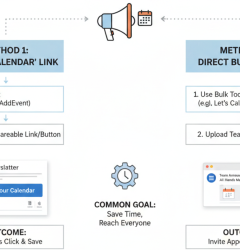
Adding Events Across Calendar Platforms
A key part of successful scheduling is making it easy for prospects to join.
A good system allows users to:
This ensures recipients can quickly add event to my calendar without friction.
How Let’s Calendar Simplifies Demo Scheduling
Let’s Calendar is designed specifically to help teams automate scheduling without complexity.
Here’s how sales teams can use it:
Step 1: Login
Register for free and Access your Let’s Calendar dashboard.
Step 2: Create Campaign
Add demo details such as title, time, and meeting link.
Step 3: Upload Attendees
Upload your list of prospects or leads.
Step 4: Send Invites
Instantly send bulk meeting invites in outlook or across platforms while keeping each invite personalized.
Step 5: Track RSVP
Monitor who accepted, declined, or hasn’t responded all in real time.
This makes managing multiple calendar invites simple, structured, and scalable.
Best Practices for Sales Demo Scheduling
To get the best results:
- Keep your invite clear and focused
- Use strong subject lines
- Add meeting agenda
- Include timezone clarity
- Send timely reminders
When done right, even a simple scheduling process can significantly improve conversions.
Why Sales Teams Are Moving to Automation
Sales today is not just about outreach, it’s about experience.
A smooth scheduling experience:
- Builds trust
- Shows professionalism
- Reduces friction
- Speeds up decision-making
The ability to send bulk meeting invites in outlook or across platforms without manual effort is now becoming a standard for high-performing teams.
Conclusion
Automate demo scheduling should never be a bottleneck.
But for many sales teams, it still is.
Manual processes slow things down, create confusion, and cost valuable opportunities.
Automation changes everything.
With the ability to send mass meeting invites, manage responses, and handle scheduling at scale, teams can focus on what truly matters, closing deals.
Let’s Calendar is helping sales teams make this shift from manual coordination to smart, automated scheduling that drives results.






Recent Comments