Best Way to Send Calendar Invites to 100+ People in Gmail and Outlook
Organizing webinars, conferences, or client meetings and sending calendar invites to 100+ people is not just about great content, it’s about making sure the right people actually show up. And that starts with sending the right invites in the right way.
For event marketers, CXOs, webinar operations teams, and audience generation teams, managing invitations for 100+ attendees can quickly become messy. Many teams still rely on manual methods for sending a calendar invite, but that approach doesn’t scale well when the audience grows.
Before we go deeper, let’s quickly clarify what is a calendar invite. A calendar invite is a structured meeting request sent via email that automatically adds an event to the recipient’s calendar and allows them to accept, decline, or mark tentative. It ensures the event stays visible and improves attendance significantly.
In this guide, we’ll break down the best and most practical way to send calendar invites at scale using Gmail, Outlook, and modern tools like Let’s Calendar so your team can manage large events professionally and without stress.
Why Sending Calendar Invites to 100+ People Is Challenging
Sending invites to a handful of people is easy. Sending them to hundreds is not.
When organizers try to manually send meeting invites, they often run into problems such as:
- Gmail or Outlook sending limits
- Spam or deliverability issues
- Lack of personalization
- No clear RSVP tracking
- Confusing follow-ups
Marketing and audience teams want scale.
CXOs want professionalism.
Operations teams want control.
Without the right process or tool, these goals are hard to achieve.
Common Methods Teams Use (And Their Limitations)
Manual Gmail Invites
Many teams start with a simple meeting invite in gmail. This works fine for small meetings but becomes risky for larger groups.
Limitations include:
- Recipient limits per invite
- Risk of sending errors
- No personalization per attendee
- Difficult to track responses clearly
If you try to manually send hundreds of invites from Gmail, it can quickly become time-consuming and confusing.
Outlook Calendar Invites
Enterprise teams often send meeting invites in outlook for webinars and conferences. Outlook works well internally but has limits for large external audiences.
Challenges include:
- Hard to personalize each invite
- Limited tracking visibility
- Not ideal for marketing-style event invitations
When your attendee list crosses 100+, these limitations become very visible.
What Modern Event Teams Actually Need
Today’s event organizers need more than just basic calendar sending.
They need:
- Personalization for each attendee
- Ability to send invites 1:1 at scale
- RSVP tracking and response visibility
- Discreet sending without spam issues
- Easy updates and reminders
This is where modern invite software like Let’s Calendar helps bridge the gap between basic email tools and professional event operations.
Best Way to Send Calendar Invites to 100+ People
Let’s break this into a simple, practical process that works for webinars, conferences, and client meetings.
Step 1: Prepare Your Attendee List
Start with a clean list of contacts:
- Remove duplicates
- Confirm email accuracy
- Segment attendees (VIPs, speakers, general audience)
This helps ensure better delivery and personalization.
Step 2: Decide the Type of Invite Experience
Before sending, decide:
- Is this a webinar, conference session, or client meeting?
- Do attendees need personalized joining links?
- Will you send reminders?
Clear planning helps you avoid confusion later.
Step 3: Create a Professional Calendar Invite
A good invite should include:
- Event title
- Date and time with correct timezone
- Joining link or venue
- Agenda or key details
- Contact information
This ensures recipients understand the event clearly and are more likely to attend.
How to Send Calendar Invites Using Gmail
Many users search for how to send calendar invite gmail when planning webinars or meetings. Here’s a simple approach.
Basic Steps in Google Calendar
- Open Google Calendar
- Create a new event
- Add title, date, and meeting link
- Add guest emails
- Click send
This method works well for small groups but becomes difficult for large audiences.
Teams often also search how to send a calendar invite on gmail when managing external attendees. The answer is simple: Gmail alone is not built for bulk professional invites. It works best when supported by a dedicated tool.
How to Send Calendar Invites Using Outlook
Outlook is widely used in corporate environments.
To send meeting invites in outlook:
- Open Outlook calendar
- Create new meeting
- Add recipients
- Add meeting details
- Send
This works for internal meetings and smaller external groups. However, sending hundreds of invites manually through Outlook can create delivery and tracking challenges.
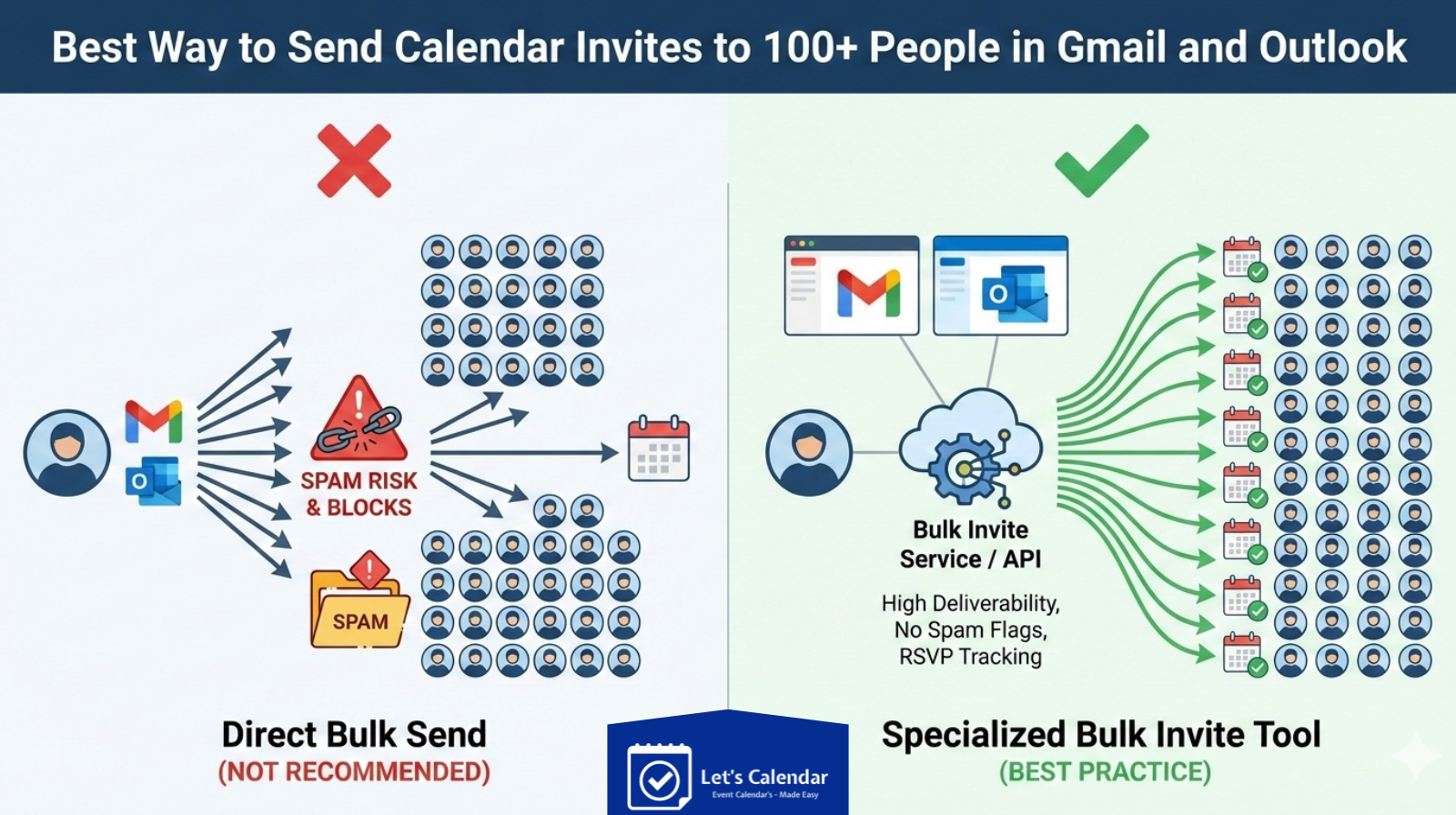
The Smart Way: Send 1:1 Invites at Scale Using Let’s Calendar
Let’s Calendar is designed for teams that need to send bulk meeting invite campaigns without looking like bulk sends.
Instead of sending one mass invite, the platform sends invites individually to each attendee. This improves:
- Deliverability
- Personalization
- RSVP tracking
- Professional experience
Step-by-Step: Sending 100+ Calendar Invites With Let’s Calendar
1. Create Your Event
Add:
- Event title
- Date and time
- Meeting link
- Agenda or instructions
Ensure all key details are clear and accurate.
2. Upload Your Contact List
Import contacts from:
- Excel or CSV
- CRM tools
- Marketing platforms
You can include custom fields for personalization.
3. Personalize Each Invite
Personalization improves response rates.
You can customize:
- Attendee name
- Company name
- Custom joining links
- Special instructions
This makes each invite feel individually sent.
4. Send Invites Discreetly
Instead of sending one bulk email, Let’s Calendar sends invites one by one automatically.
This avoids:
- Spam filters
- Sending limits
- Reputation issues
It also ensures a professional experience for recipients.
Why Personalization Matters in Large Events
When sending invites to 100+ attendees, personalization creates impact.
For webinars:
- Include session-specific links
- Mention role or interest
For conferences:
- Add track or session info
- Include venue details
For client meetings:
- Add agenda
- Include relevant documents
A personalized invite feels intentional and increases acceptance rates.
Tracking Responses and Engagement
One major benefit of using a dedicated tool is response tracking.
You can see:
- Accepted invites
- Declined invites
- Pending responses
This helps marketing and operations teams plan better and improve attendance.
Adding Events to Attendee Calendars Easily
A key benefit of calendar invites is the ability to add to calendar automatically.
When recipients accept:
- Event appears in their calendar
- They receive reminders
- They are less likely to miss the session
This simple step significantly improves attendance rates for webinars and conferences.
Common Mistakes to Avoid
Even experienced teams make these mistakes:
Sending All Invites at Once
This can trigger spam filters and reduce delivery rates.
No Personalization
Generic invites feel like marketing emails and may be ignored.
Missing Important Details
Always include a joining link, time zone, and agenda.
No Tracking
Without tracking, you won’t know who is attending.
Avoiding these mistakes ensures smoother event execution.
Why Modern Teams Choose Let’s Calendar
Let’s Calendar helps teams:
- Send invites at scale without looking bulk
- Personalize each invite
- Track responses easily
- Manage large events professionally
For marketing teams, it improves attendance.
For CXOs, it maintains professionalism.
For operations teams, it brings control and visibility.
Final Thoughts
Sending calendar invites to 100+ people so we don’t have to be stressed. With the right approach and the right tools, it becomes a smooth and reliable process.
Instead of struggling with manual methods, modern event teams are moving toward smarter solutions that allow them to scale without losing control.
If your team regularly manages webinars, conferences, or client meetings, using a structured approach to calendar invites can dramatically improve attendance, professionalism, and overall event success.






Shubhi Patel