Zoom Integration Live: Automate your invites today

Send Zoom Meeting Invitation at Scale, Automatically

Let's Calendar automates your Zoom meeting invites, with smart personalization and unlimited contacts. Stop copying Zoom links manually. Let us do it for you.

Send Calendar Invi

How It Works.

1

Connect Your Zoom Account

One-click integration pulls your meetings automatically without friction.

2

Create a Campaign

Configure layouts smoothly with Zoom Meeting/Webinar IDs and deep personalization.

3

Fetch Contact

Automated cloud sync sweeps data points directly every 1 hour.

4

Sent Invites

Invites queue automatically and push out systematically on the hourly cycle.

5

RSVP

Track delivery logs and success parameters cleanly from your active operational desk.

Everything You Need to Automate Calendar Invites

Zoom Account

Create your Zoom Webinars and Meetings and save the meeting id.

Zoom App

Create a Zoom App from Zoom Marketplace with the required scopes and save the Zoom App credentials.

Email Service

You can use any email service like google workspace, Miscrosoft O365, Brevo, SendGrid, Mailjet, Mailgun, Elastic Email, Custom

Let's Calendar Account

Use the zoom app credentials & integrate in Let's Calendar Account. Ready to Create Campaings

Create Campaign

Use the Zoom webinar & meetings ID while creating the campaign

Invite Send Automation

Let's Calendar send invites to all new participants every 1 hour

How to Send a Zoom Meeting Invite
The Complete Guide

Step 1

Pre-requisite: Create Zoom App in Zoom Marketplace

Link

Step 2

Configure Zoom App in Let’s Calendar

Link

Step 3

Log in to Zoom and create Meetings or Webinar

Step 4

Go to Let’s Calendar and create a campaign with the same details with meeting or webinar ID.

Step 5

Let’s Calendar Handle everything for sending the invitation

Trusted by Creators and Teams Worldwide

See how fast-growing businesses leverage Let's Calendar to eliminate administrative friction and secure attendance.

Manually processing invites for thousands of attendees was our biggest logistical bottleneck. This completely automates the entire webinar lifecycle—the calendar links land instantly, and our attendance rates skyrocketed overnight.

Sarah Jenkins

Director of Event Operations

The personalization scale here is unreal. Every individual attachment lands cleanly from our own account domains with custom recipient names and unique metadata perfectly embedded. It looks entirely native, tailored, and premium.

Marcus Vance

Growth & Marketing Lead

We manage dozens of multi-week recurring corporate cohorts simultaneously. Being able to set up the sequence sync engine once and watch future schedule blocks map themselves out automatically has saved our team hundreds of operational hours.

Elena Rostova

Head of Client Success

Streamline Your Zoom Meeting Workflow

Automate calendar invites for your Zoom webinars and meetings with powerful personalization and unlimited scalability.
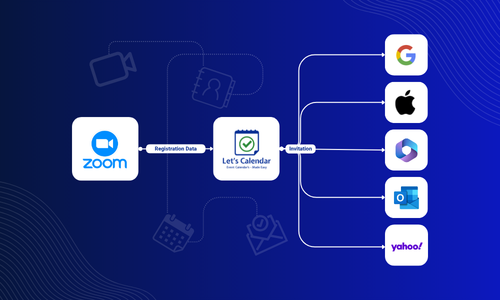
Zoom Integration Spotlight Dashboard Demo

Automatically pull Zoom meeting links, IDs, and passcodes

Send calendar invites the moment a meeting is created or updated

Sync meeting changes across all previously sent invites instantly

Works with Zoom Meetings, Webinars, and recurring events

Compatible with Google Calendar, Outlook Calendar, Apple Calendar, and all calendar applications.

Who Organizes Zoom Webinars?

Let's Calendar effortlessly automates individual data dispatches and calendar scheduling across dozens of modern professional sectors.

NGOs & Fundraisers

Real Estate Companies

Investment Firms

Tech Companies

Business Coach

Freelancers

Yoga Instructors

Training Institutes

Online Tutors

Frequently Asked Questions

Schedule your Zoom meeting, connect Zoom with Let’s Calendar, and create a campaign. Invites are automatically sent via email to all your attendees, no manual copy‑pasting required.
Once your Zoom meeting is created, Let’s Calendar automatically pulls the meeting link and shares it with all invitees through calendar invites, ensuring everyone has the correct link.
Schedule your Zoom meeting, connect it with Let’s Calendar, and create a campaign. The platform automatically fetches new registrations every hour and sends personalized invites, so your attendee list stays updated without manual effort. You can also upload a CSV/XLSX list to send invites to all participants.
Yes. Let’s Calendar supports unlimited contacts, so you can send Zoom invites to hundreds or even thousands of attendees in a single campaign.
A Zoom invite is the meeting link and details generated inside Zoom. A calendar invite adds that Zoom link into Google Calendar, Outlook, or Apple Calendar, making it easy for attendees to RSVP, get reminders, and join with one click.

Stop sending Zoom invites manually. Ever again.

Join hundreds of teams who automate their Zoom meeting invites with Let’s Calendar.

No Credit Card Read the Zoom Guide
Google Calendar Microsoft Outlook Apple Calendar