How Event Organizers Automate Calendar Delivery
Running a successful webinar, conference, or client meeting today is about more than just preparing great content, it’s about making sure the right people actually show up. And the backbone of attendance by automate calendar delivery isn’t just email reminders or social media posts. It’s the humble calendar invite.
Many organizers underestimate how crucial it is to deliver clean, reliable calendar invites. Whether it’s Gmail, Outlook, Apple Calendar, or Android, the way invites are sent can directly impact attendance. Missed invites, duplicate events, or messages landing in spam can easily reduce turnout, even for a high-profile session.
This is where automation comes in. By automating event invites, organizers can ensure that every attendee receives their invite on time, correctly formatted, and in a way that syncs perfectly with their calendar without the stress of manual sending.
Why Automated Calendar Delivery Is Essential
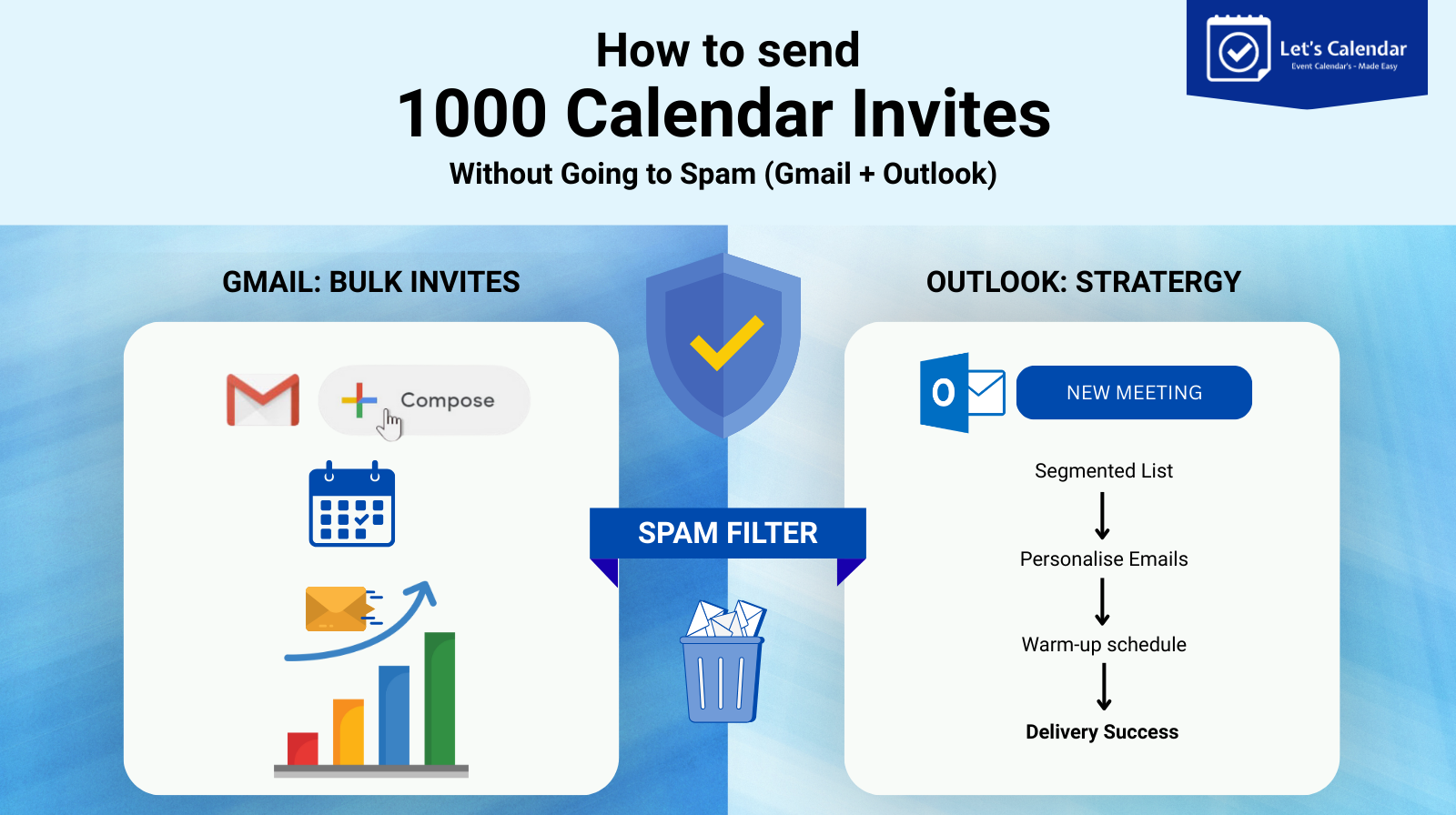
When you plan an event, you often deal with hundreds or even thousands of attendees. Manually sending each calendar invite is not only time consuming but also prone to errors. For example, a slight typo in an email, an incorrect time zone, or a missing meeting link can confuse attendees. And if you try to send too many invites at once, Gmail or Outlook might flag them as spam, blocking your messages altogether.
Automation solves these problems. Tools like Let’s Calendar allow event organizers to send invites individually at scale. This means each recipient gets a personalized message, which is more likely to be accepted and added to their calendar. Automated invites also make it easy to update attendees if there’s a schedule change, without sending countless follow-up emails.
Using automation ensures that your calendar in bulk distribution is reliable, professional, and seamless.
Challenges With Manual Calendar Invites
Many organizers still attempt to send invites manually, thinking it’s simple. But manual sending often causes multiple issues:
- Spam and Delivery Problems:
Sending a large number of invites at once can trigger spam filters in Gmail and Outlook. Emails may end up in the promotions tab or the spam folder, meaning your audience never sees the invite.
- Time Zone Confusion:
Attendees across different regions may see the wrong time, leading to missed sessions. Manually adjusting time zones for hundreds of people is nearly impossible.
- No Personalization:
A generic invite with no name, session details, or personalized notes feels impersonal. This decreases the likelihood that attendees will add it to their calendars.
- Difficult Updates:
If the event changes, you must manually update each invite and resend it. Any missed step creates confusion and missed sessions.
- Limited Tracking:
Without automation, you can’t easily see who accepted the invite, who declined, or who hasn’t responded.
Clearly, manual calendar invites are risky, especially for large-scale webinars or conferences.
How Automation Helps Organizers
Automation transforms calendar delivery from a tedious task into a smooth, reliable process. Here’s how it works:
- Personalized Delivery: Each attendee gets a unique invite that includes their name, session details, and any relevant notes. This improves engagement and reduces the chance of emails being ignored or flagged as spam. Keywords like how to send a calendar invite in Gmail or how to send an Outlook invite are resolved automatically because each platform receives the correct format.
- Cross-Platform Compatibility: Automated systems ensure that invites work on Gmail, Outlook, Apple Calendar, and Android. Attendees don’t need to worry about file formats or compatibility issues.
- Bulk Distribution Without Spam Risk: Automation tools send each invite individually, which avoids spam filters. Even when sending thousands of invites, the process remains discreet and professional.
- Real-Time Updates: Any changes to the event like a new session time, updated link, or speaker swap are automatically reflected in attendees’ calendars. No one has to manually resend messages.
- Easy RSVP Tracking: You can see in real time who has accepted, declined, or not responded. This helps teams plan sessions, manage resources, and follow up efficiently.
Automation ensures that every invite works perfectly, regardless of the attendee’s email client or device.
Step-By-Step Example of Automating Calendar Invites
Let’s look at how a typical organizer might automate their invites:
- Prepare the Event Details:
Include title, date, time, description, speaker information, and session link.
- Upload Attendee List:
Clean up email addresses and categorize participants by session or access level.
- Personalize the Invite:
Use dynamic fields to insert names, ticket types, or session numbers.
- Enable Cross-Platform Delivery:
The system generates invites compatible with Gmail, Outlook, Apple Calendar, and Android. Attendees can simply click add to calendar without worrying about formatting.
- Send Automatically:
Each attendee receives a 1:1 invite in their inbox. Bulk delivery is handled behind the scenes to avoid spam.
- Track Responses:
Organizers can see RSVPs, follow up with non-responders, and update attendees if details change.
This workflow removes nearly all manual steps while keeping everything professional and reliable.
Benefits of Automated Calendar Delivery
- Saves Time: Automation eliminates hours of work sending individual invites.
- Reduces Errors: Automatic formatting and validation prevent mistakes in links, times, and email addresses.
- Improves Attendance: Personalized invites and reminders increase the likelihood that attendees will show up.
- Enhances Professionalism: Attendees receive consistent, clear, and timely information.
- Scales Easily: Whether you have 50 attendees or 5,000, the process remains smooth.
By automating calendar invites, organizers can focus on content, speakers, and attendee experience instead of tedious administrative tasks.
Practical Tips for Organizers
- Always test your invite before sending it to all attendees.
- Ensure time zones are correct for global audiences.
- Keep descriptions concise but informative.
- Include clear add to calendar buttons or links for ease of use.
- Use automation to handle updates rather than resending manual invites.
Following these best practices ensures that your invites are reliable and your events run smoothly.
Conclusion
Sending calendar invites manually or automate calendar delivery is risky, time-consuming, and often error-prone. Modern event teams now rely on automated systems to handle invites professionally, safely, and at scale. By personalizing each invite, ensuring cross-platform compatibility, and tracking responses in real time, automation drastically improves attendance and reduces stress for organizers.
Whether you are hosting webinars, conferences, or client meetings, automated calendar delivery is no longer optional, it’s essential. With a platform like Let’s Calendar, event organizers can streamline their workflows, ensure that every attendee receives the correct information, and focus on running engaging, successful events.
Create & Send Calendar Invites Instantly, Try Free for 100 Credits.




Shubhi Patel