Introduction
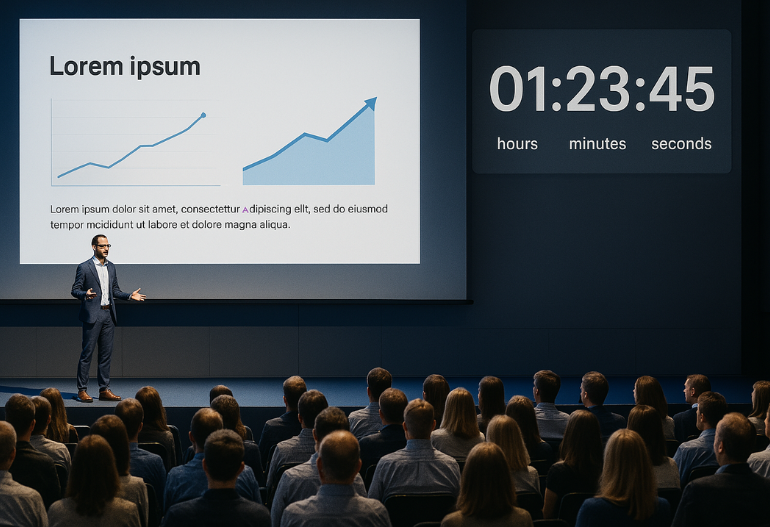
Event organizers face the challenge of managing Event timer effectively during conferences, meetings, and webinars. A well-timed event ensures a smooth flow, keeps speakers on track, and enhances attendee experience. By using a Conference countdown timer or Event session time management tools, organizers can automate time tracking and ensure seamless event execution.
One of the best ways to manage time efficiently is by leveraging Let’s Time IT, a tool designed to schedule and control countdown timers at scale. Whether you’re running a small meeting or a large conference, Let’s Time IT discreetly manages countdown timers to keep everything on schedule.
The Importance of Countdown Timers in Event Management
1. Keeping Speakers on Track
- Helps speakers stick to their allotted time without going over schedule.
- Reduces the risk of long, drawn-out sessions that cause delays.
2. Enhancing Attendee Experience
- Ensures that sessions start and end on time.
- Avoids event fatigue by maintaining a structured schedule.
3. Reducing Event Delays
- Keeps all activities running smoothly.
- Prevents unexpected scheduling conflicts.
4. Improving Event Flow
- Ensures seamless transitions between sessions, speakers, and activities.
- Helps moderators and event staff coordinate better to maintain a smooth schedule.
5. Enabling Real-Time Adjustments
- Allows organizers to extend or shorten sessions dynamically based on audience engagement.
- Provides flexibility to accommodate unforeseen changes without disrupting the agenda.
6. Boosting Speaker Confidence
- Gives speakers a clear visual indication of their remaining time.
- Reduces last-minute rush or abrupt endings by offering structured timing.
7. Enhancing Virtual and Hybrid Event Management
- Synchronizes countdown timers across in-person and virtual attendees.
- Ensures remote participants stay engaged without excessive delays.
8. Increasing Audience Engagement
- Keeps sessions concise and interactive, reducing distractions.
- Encourages timely Q&A sessions by allocating fixed discussion periods.
How to Add Countdown Timers with Let’s Time IT
Step 1: Creating an Event Timer
- Log in to Let’s Time IT.
- Navigate to the “Create” section.
- Set the Campaign Title, Campaign Description, and Expiry Date of the campaign.
Step 2: Syncing Timers with Speaker Schedules
- Assign countdown timers to specific speakers.
- Configure notifications to remind speakers of their upcoming sessions.
Step 3: Enabling Discreet Countdown Displays
- Ensure speakers receive real-time countdown alerts without distracting the audience.
- Set up discreet notifications visible only to the speaker.
Step 4: Adjusting Timers Remotely
- Pause, extend, or shorten session durations dynamically.
- Ensure flexibility to adapt to last-minute changes in the event schedule.
By implementing these steps, event organizers can manage speaker transitions with ease and efficiency.
How Let’s Time IT Enhances Event Time Management
Enhancing event time management is crucial for seamless and professional events. Let’s Time IT offers a suite of features designed to keep your events on schedule:
- Seamless Multi-Platform Integration
- Integrates effortlessly with platforms like OBS Studio and Stream Deck, allowing you to display countdown timers on various screens and devices.
- Real-Time Adjustments
- Enables dynamic control over timers, allowing you to pause, extend, or shorten session durations as needed to accommodate real-time changes during events.
- Custom Alerts & Notifications
- Allows for discreet messaging to speakers, enabling organizers to send important alerts or updates without interrupting the flow of the presentation.
- Multi-Session Management
- Facilitates the creation and management of a series of timers for back-to-back sessions, ensuring smooth transitions and adherence to the event schedule.
- Customizable Interface
- Offers options to display your own logo, company details allowing for a branded and personalized timer display.
- Discreet Messaging
- Enables the sending, discreet messages to speakers during their presentations, allowing organizers to communicate important information without disrupting the session.
- OBS Studio & Stream Deck Support
- Provides integration with OBS Studio and Stream Deck, facilitating the display of countdown timers on various screens and enhancing the production quality of virtual events.
By leveraging these features, Let’s Time IT empowers event organizers to execute well-timed, efficient, and professional events.
Conclusion
In today’s fast-paced event environment, efficient time tracking is key to ensuring seamless schedules, smooth transitions, and an engaging attendee experience. With Let’s Time IT, event organizers can automate countdown timers, manage speaker sessions effortlessly, and maintain real-time control over event timing—all without disruptions. Whether you’re hosting a conference, webinar, or corporate meeting, Let’s Time IT ensures that every session starts and ends on time, keeping your event professional and well-organized.
Take control of your event timing today—start using Let’s Time IT to eliminate scheduling stress and enhance event efficiency!
Related Blogs:
- How to Use Let’s Time IT to Manage Session Timings for Large-Scale Events
- Countdown Timers vs. Manual Timekeeping: Which Is More Effective?




Shubhi Patel